Showing posts with label GIS Programming. Show all posts

Wednesday, June 24, 2020

Module 7: Rasters


     This week's lab required us to create a raster through geoprocessing and map algebra. We were tasked with writing code that would reclassify the values of a landcover raster dataset. We also used the Slope and Aspect functions to find the slope and aspect values from an elevation raster. These slope and aspect values were then used to create four temporary rasters using map algebra. These four temporary rasters were meant to select for specific ranges in both slope and aspect. The four slope and aspect rasters were combined with the reclassified landcover raster using ampersands (&). The lab culminated with us saving this final raster, pictured above (top). The flowchart for my script is shown above (bottom) as well.
     The most difficult part of this lab was saving the final raster. I received an error stating that the raster had no tif attribute. I placed the file extension before the .save function (finalrast.tif.save(S:\GIS_Programming\...)). This returned an invalid pointer error. I then began searching online to look for similar issues and found a thread on stack overflow. Following the advice I found on the thread, I moved the file extension to the end of the file path (...\Results.tif). This allowed me to save the raster; however, it saved in the wrong location. I solved the issue by adding the file name to the file path before the extension (..\Results\FinalRaster.tif).

Wednesday, June 17, 2020

Module 5: Exploring & Manipulating Data

a)

b)

c)

d)

e)

f)

     This week's lab required us to create a geodatabase and to copy feature layers into it via python code. We were then tasked with creating a search cursor to find cities that were county seats. The lab also had us create a dictionary and populate it with these cities using a for loop. The results of my script are depicted above in screenshots a-e, and the flowchart for the script is shown in screenshot f.
     While printing the results of the search cursor, I kept receiving an error from the POP_2000 field. The value of the field is an integer and the code I was using required a string. I tried putting the code in quotes, but that just returned the code and not the value desired. I took a brief break and realized that I needed to turn the value into a string by placing the code within the str() function. This fix was a simple one, yet it was the only part of the lab that I struggled with.

Wednesday, June 10, 2020

Module 4: Geoprocessing


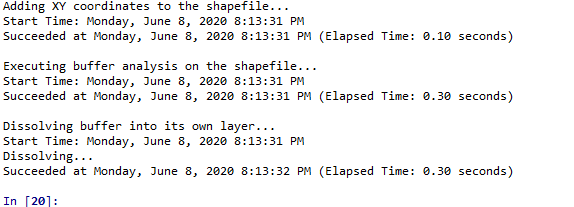
     This week's lab introduced us to how python can be used for geoprocessing purposes. We were required to create a model in ArcGIS Pro's model builder that utilized the Clip, Select by Attribute, and Erase geoprocessing tools. We were also tasked with writing code that added XY coordinates to a shapefile, created a buffer around the features of that shapefile, dissolved the buffer into its own feature layer, and returned messages after each of these actions. The results of this code are depicted in the above (top) screenshot.
     I began by writing the code to import the arcpy and env modules. I then wrote the code for setting the workspace and adding the XY coordinates. I manually wrote the code for printing the task being conducted and utilized the GetMessages function for the rest of the messages printed. At this point, I realized I had not included a means for overwriting outputs and went back to insert code for this after the workspace setting. The code for creating the buffer came next, along with the manual code for printing the task and the GetMessages function for the rest of the printed messages. I included \n in the print code to make the printed messages easier to read. Finally, I wrote the code for dissolving the buffer into its own layer and for printing the messages. The code for these messages was written in the same manner as the previous messages, also with the inclusion of the \n. All code in the script used the syntax for a stand-alone script. The flowchart for this script is depicted in the above (bottom) screenshot.

Wednesday, May 27, 2020

Module 2: Python Fundamentals


     This week's lesson focused on the fundamentals of Python. The lab required us to write code that printed our last name from a list, compiled a list of random integers between 0 and 10, and removed a designated integer from that list. We were also required to debug a selection of code for a dice game. In the process of completing the assignment, we were required to utilize while loops and several methods. Among these methods were the append, remove, and count methods.
     For the removal of the designated integer, first I assigned the integer to be removed to the variable "unlucky". I then wrote the code for finding, counting, and printing the number of "unlucky" integers in the "luckyList" list before I ran the code to test it and copy/pasted it into the script. The code for the removal of all "unlucky" integers from the list was written and then ran to test it before it too was copy/pasted into the script. Finally, I wrote the code for printing luckyList and ran the script to ensure the whole code worked together. The results of the script (top) and the flowchart for the creation and updating of luckyList (bottom) are pictured above.

Monday, May 18, 2020

Module 1: Introducing Python


     This week's lab had us open a code file in Spyder and run the code to create the data folder file paths we will need for the rest of the semester in GIS Programming. The resulting data folders for each module are shown in the screenshot above. The process of opening the code file and running the code was rather simple and intuitive. The most confusing part of the assignment was the code itself. Fortunately, this was provided to us and will surely make more sense as the semester progresses. I look forward to the rest of this class and understanding how this code works.